Gym membership cards your members never forget at home
Members forget plastic key tags. They never forget their phone. MPass gives every member a gym membership card with a QR code, by email or text, that they can add to Apple Wallet or Google Wallet. You check them in at the front desk with any phone or tablet.
No sign-up or credit card · your test card in 1 minute

 T-7Q4K2M
 M-MU-00384
One card template per activity
 Basketball
 Volleyball
 Swimming
 Martial arts
 Cycling
 Golf
Golf Theatre
 Student societies
How it works: 3 steps
1. Pick your sport or activity
Soccer, tennis, pickleball, martial arts, swim team, rec league, booster or alumni club… The card is already designed. Add your logo and colors.
2. Add your members
Type them in, import a spreadsheet, or share a join link so members sign themselves up.
3. Members show their card
Each member gets their card by email or text, with the QR code right there: nothing to install, perfect for older members. They can also add it to Apple Wallet or Google Wallet. You scan it at the door with any phone.
What MPass does for your club

Membership cards in the Wallet
Each member adds their card to Apple Wallet or Google Wallet in one tap. It updates itself: tier, validity, renewal.

Tickets and invitations
Create an event, share the link, scan at the door with your phone. Parties, matches, tournaments, galas.

One-shot Excel import
Import your member list (Excel or CSV): all the cards are created in one go, with one link per member.

Sent automatically by email
Each member gets their card by email: the QR code shows right in the email, so they just show it at the door, with nothing to install. Ideal for members who are less comfortable with phones. Apple Wallet and Google Wallet stay optional, and the link can also go out by SMS or WhatsApp.
Built for clubs and leagues
Soccer, tennis, pickleball, martial arts, swim teams, rec leagues, booster and alumni clubs: 90 ready-made card designs, one per activity, in your colors.
Membership fees stay with the club
MPass never touches your members’ money: they pay the club as usual (bank transfer, cash) and you activate their card.
Why gyms and studios move the membership card to the phone
A plastic card or key tag costs money to print, gets lost every month and says nothing about whether the member is still paying. At the front desk, staff end up looking members up by name.
A digital gym membership card fixes that. The card shows the member’s name, plan (monthly, 10-class pack, annual) and expiry date, with a QR code. Scan it with the MPass scanner on any phone: it shows at once whether the membership is valid, expired or unpaid.
When a member renews or changes plan, you update them in MPass and the card on their phone updates by itself. No reprinting, no new card to hand out.
MPass is not a full gym management system: it does not take payments or book classes. It works next to the tools you already use, and suits independent gyms, CrossFit boxes, yoga and pilates studios, climbing gyms and martial arts schools that want a simple card and check-in. Plans start at $39 a month for up to 300 cards ($89 for 1,000), with no fees on dues or tickets and a 30-day money-back guarantee.
Pick your sport, the card is ready
Each activity has its own design: colours, 3D object, card title, membership plans. You add your logo, your text and the back of the card. The design stays consistent, and your members recognise their club at a glance.
Create my test card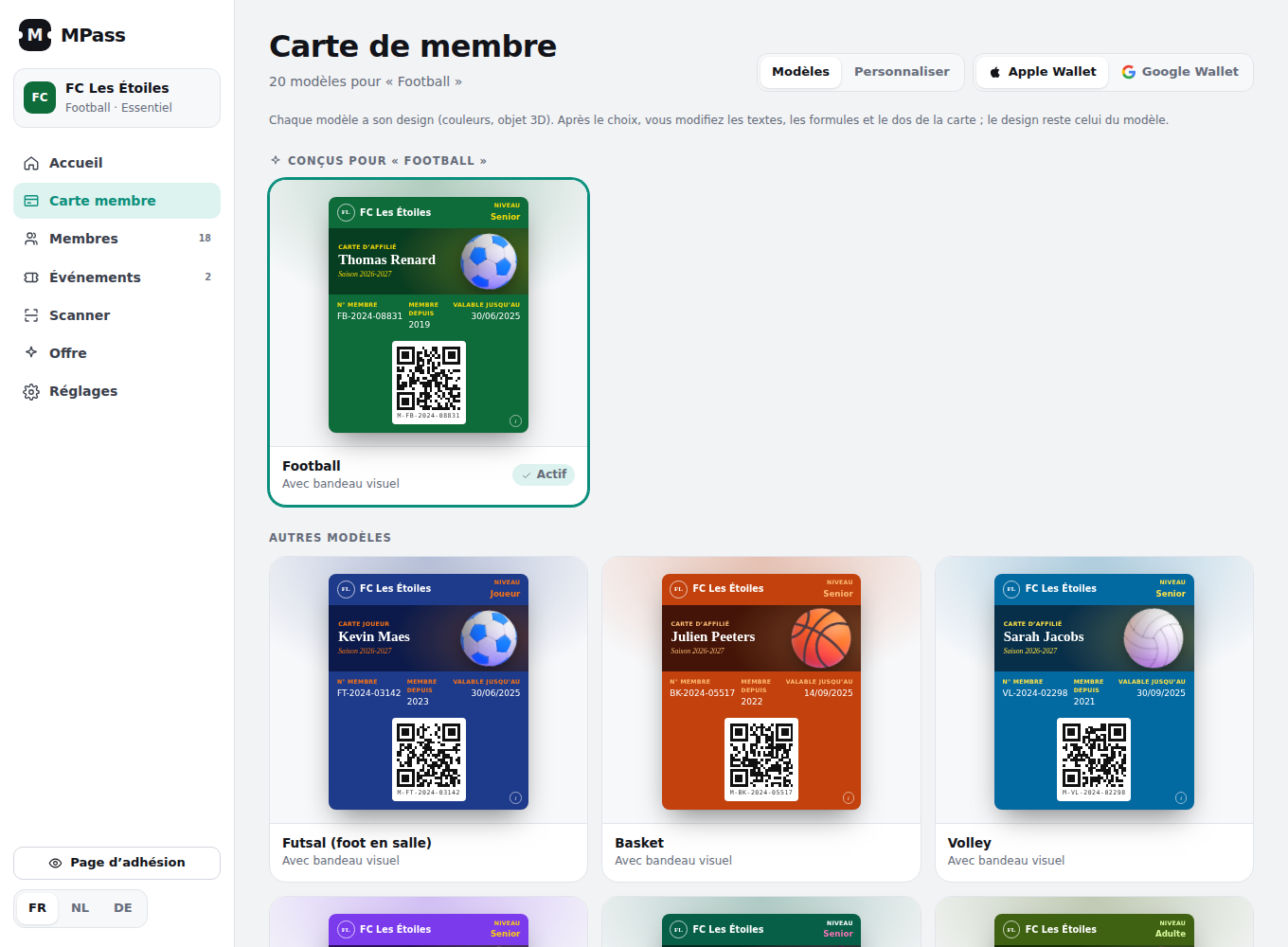
Simple pricing, no commission
Essential
- 300 membership cards
- 150 tickets per month
- Renewal reminders
- Self-service join link
- Email delivery of every card
Pro
- 1,000 membership cards
- 300 tickets per month
- Excel / CSV import: all cards at once
- Unlimited events
- No MPass branding
No contract, cancel anytime. 30-day money-back guarantee. MPass never touches your dues: members pay your club the way they already do.
Prices in US dollars. Any applicable sales tax is added at checkout by Paddle, our reseller (Merchant of Record). Terms · Refunds.
Frequently asked questions
Do members need to download an app?
No. The card arrives by email or text and opens on any phone; members can also add it to Apple Wallet or Google Wallet in one tap.
How do we check members in?
Open the MPass scanner on any phone or tablet at the front desk and scan the QR code. It shows valid, expired or unpaid, with the member’s name and plan.
Can the card show class packs or plans?
Yes. Each card shows the member’s plan or tier and expiry date. You choose the names: monthly, annual, 10-class pack, student.
Does MPass take membership payments?
No. Members pay you the way they do today. You mark them paid or renew them in MPass, and their card updates.
Can you set it up for us?
Yes. Send us your member list (Excel, CSV, PDF or even a photo) and we create every card with your logo and colors. Nothing is sent to your members until you say so. It is included in every plan.